Bank statement converter
Bank statement PDF to Excel, checked to the cent.
Upload the PDF statement you downloaded from your bank. Get a clean spreadsheet of dated transactions, with every row checked against the running balance.
- Excel (.xlsx) and CSV
- Balance check on every row
- Files deleted after 1 hour
- No account, no subscription
Payments are opening soon. Until then, conversion and the preview are open to everyone, and your first file of up to 3 pages each day is free to download.
- First file up to 3 pages free each day
- Deleted after 1 hour
Uploading
Reading the transactions and checking every balance.
We could not convert this file
Conversion ready
Your statement is ready
- Opening balance
- Money in
- Money out
- Closing balance
Preview
| Date | Description | Amount | Balance | Row check |
|---|
Converted automatically, with no person looking at your file. Check the totals against your statement before you rely on them: rows that do not match the running balance are marked here and highlighted in the Excel file. This is not accounting, tax or legal advice.
This conversion has expired
Files are deleted 1 hour after conversion. Upload the statement again to convert it.
Convert a statementSee a real result
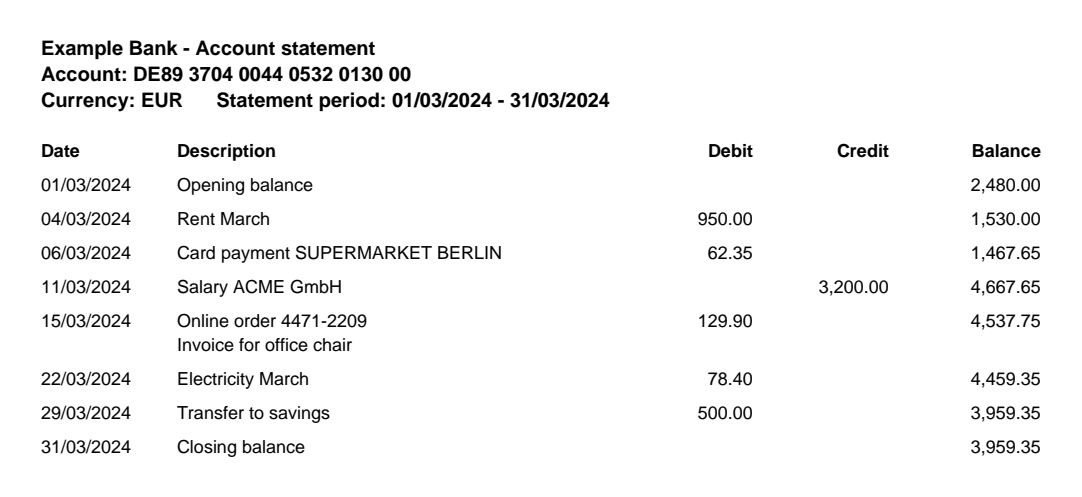
A synthetic statement from a made-up bank, converted by Tanod exactly as your file would be. Debit and credit columns become one signed amount, dates become real dates, and every row is checked against the running balance.
6 of 6 rows match the running balance
Opening balance 2,480.00 + 1,479.35 in transactions = closing balance 3,959.35.
| Date | Description | Amount | Balance | Row check |
|---|---|---|---|---|
| 2024-03-04 | Rent March | -950.00 | 1,530.00 | |
| 2024-03-06 | Card payment SUPERMARKET BERLIN | -62.35 | 1,467.65 | |
| 2024-03-11 | Salary ACME GmbH | 3,200.00 | 4,667.65 | |
| 2024-03-15 | Online order 4471-2209 Invoice for office chair | -129.90 | 4,537.75 | |
| 2024-03-22 | Electricity March | -78.40 | 4,459.35 | |
| 2024-03-29 | Transfer to savings | -500.00 | 3,959.35 |
- Opening
- 2,480.00
- Money in
- 3,200.00
- Money out
- 1,720.65
- Closing
- 3,959.35
Three steps, about a minute
-
Upload the PDF
Use the statement you downloaded from online banking, up to 30 pages. No sign-up.
-
Check the free preview
See the first page of transactions, and whether the opening balance plus the transactions equals the closing balance.
-
Download
Get an Excel workbook with a summary sheet, or a CSV for your accounting software.
Know the numbers add up
Most converters copy text and hope. We read each transaction, then check it: the previous balance plus the amount must equal the balance printed on that row, to the cent. Any row that does not match is flagged, so you look at one line instead of the whole statement.
- Signed amounts. Money in is positive, money out is negative, whether your bank prints one amount column, debit and credit columns, or CR / DR markers.
- Real dates. Day-first and month-first dates are told apart from the whole statement, and written as dates your spreadsheet understands.
- Summary sheet. Opening and closing balance, money in, money out and the result of the check, next to your transactions.
Built for people who reconcile for a living
Most banks, many languages
Statements in English, Spanish, French, German, Italian, Portuguese, Indonesian, Polish, Russian, Turkish, Vietnamese and Hindi.
Private by default
Your PDF is read on our own server and not kept. The spreadsheet is deleted after 1 hour. No ads, no trackers, no AI training.
Fast and simple
Most statements convert in a few seconds. No account to create, no software to install, works on your phone.
Pay per file
USD 2.99 a file, or packs from USD 1.38 a file for bookkeepers. No subscription. First small file free every day.
Simple pricing
Single file
USD 2.99
One statement up to 30 pages.
10 files
USD 19
1.90 per file. Credits last 12 months.
For bookkeepers
50 files
USD 69
1.38 per file. Credits last 12 months.
Questions
Can you read scanned statements?
Not yet. We read PDFs that contain text, which is what online banking gives you when you download a statement. A photo or scan of a paper statement has no text inside and will be refused, at no cost.
How accurate is it?
Every row is checked against the running balance printed on the statement, and the opening balance plus all transactions is compared with the closing balance. You see the result before you pay. Still, always check the totals before you rely on them.
What happens to my file?
Your PDF is processed on our server and not stored. The converted spreadsheet is kept for 1 hour so you can download it, then deleted. No person looks at your statement.
Do I need an account?
No. Single files are paid at download. Packs come with a credit code that you can save in your browser or keep from your receipt email.